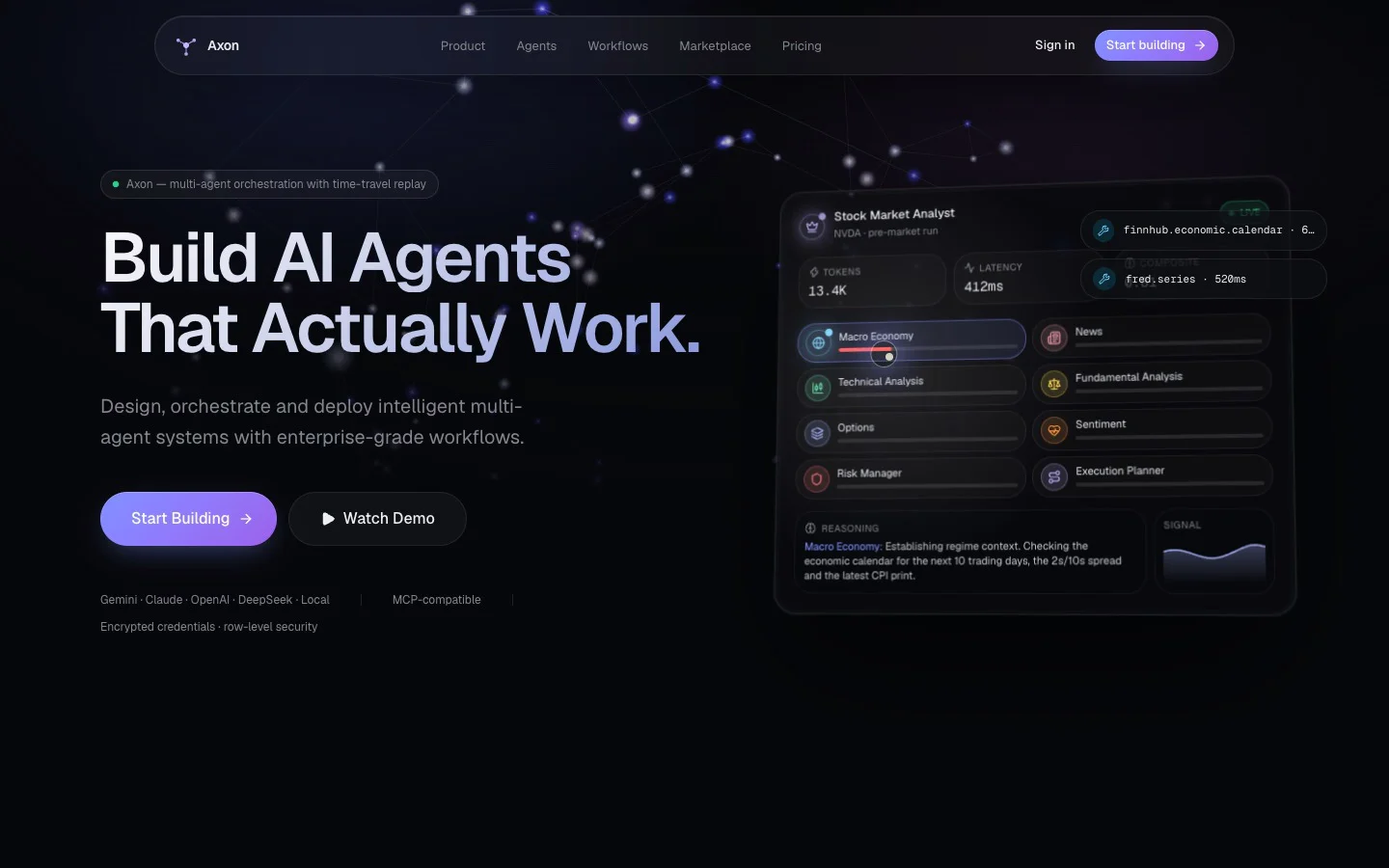
A self-hostable platform for designing, running and selling multi-agent AI systems — not a chat window. Agents are built in a full editor (role, prompts, model, tools, memory, permissions, output schema, fallbacks, guardrails and versions), wired together on a React Flow graph with parallel branches, conditional retries and human approval checkpoints, and run with live streaming through the Vercel AI SDK on Gemini, Claude, OpenAI, DeepSeek, OpenRouter or a local model. It ships with a 12-agent Stock Market Analyst workflow, 14 marketplace templates, real market-data, web-search and messaging tools, knowledge ingestion into pgvector, time-travel replay, an MCP endpoint, and the SaaS plumbing — Supabase auth with row-level security, encrypted credentials, scoped API keys, Stripe subscriptions and schedules. With no keys at all it opens in a clearly labelled simulated mode, so it runs on the first npm run dev.
Node.js 20.9 or newer. No keys, no accounts, no cost.
To run agents live
One model API key — Gemini has a free tier.
To sell it as a SaaS
Your own Supabase project, Stripe for billing, and Vercel Pro or a Docker host.
Checked before listing
Cold install, production build and all 41 tests pass on the pack as downloaded.
Who hosts it
You do. We never run it, see your data or hold your keys.
Read this before you buy
What AXON is — and what it isn't
No asterisks. If something below would change your mind, it should change it now rather than after checkout.
What it is
Complete source code for a Next.js application that you install, run and host yourself — the same build shown in the preview above.
A foundation for a multi-agent product. The agent builder, workflow engine, live execution view, integrations and SaaS plumbing are already written, typed and tested.
Runnable on day one. With no keys it opens in a simulated mode that is labelled on every screen, so you can explore everything before spending anything.
What you can do with it
Try it free in simulated mode on your own machine.
Run real agents with your own keys — Gemini, Claude, OpenAI, DeepSeek, OpenRouter, or a local model through Ollama, vLLM or LM Studio.
Deploy it for yourself or for a client, rebrand it, and charge your own customers for access to a product you build and host on it.
Change anything — agents, workflows, tools, screens. It is the full source, not a locked template.
What it is not
Not a hosted service. We don't run it, host it, store your data or keep it online. Uptime, backups, security and legal compliance of your deployment are yours.
Not free to run live. Simulated runs cost nothing. Live runs are billed to you directly by the model and data providers whose keys you add.
Not financial, medical or legal advice. The Stock Market Analyst writes research memos from market data and model output. It can be wrong, it does not place trades, and selling its output to the public as investment advice needs regulatory advice in your country first.
Not certified. It has not been audited for SOC 2, HIPAA, ISO 27001 or anything similar — don't claim that it has. Don't process health records without signed agreements from every vendor in the data path.
Not every card is a native integration. Working today: Gemini, Claude, OpenAI, DeepSeek, OpenRouter, local LLMs, Perplexity, Finnhub, Alpha Vantage, Polygon, Slack, Telegram, and Supabase in cloud mode. Pinecone, Firebase, Discord, Notion, Google Drive, GitHub, Jira, HubSpot, Stripe as an agent tool, Yahoo Finance, Twilio, AWS, Azure and Google Cloud are marked “On the roadmap” in the app — connect those through MCP or a custom tool.
Not a guarantee of results. What an agent produces depends on the model, the data and your prompts. Accuracy, returns and customer outcomes are not guaranteed.
Not fully live out of the box. Without Supabase, knowledge, memory, schedules, audit logs and API keys are demo screens, and dashboard and analytics numbers are sample data until real runs are recorded. Interactive runs are orchestrated in the open browser tab, so closing it stops the run; unattended runs go through the API or schedules, which cannot pause for a human approval.
Not finished everywhere. Knowledge ingestion reads PDF, Markdown, text, CSV, JSON, web pages and GitHub READMEs — not Word files or images yet. The MCP endpoint answers JSON over HTTP without streaming. Third-party tool costs aren't metered (model costs are). Rotating the encryption key means re-entering credentials saved in the UI.
Not for resale as code, and not a support contract. You can't resell or redistribute the source or the prompt themselves. The pack is sold as it is: anything broken or missing we fix, but setup help beyond this guide and custom agents are separate studio work.
About the prompt on its own
The prompt is the brief that produced AXON, word for word — not the code. Give it to a coding agent and you get that agent's own interpretation, which will not match this build line for line, and a platform this size takes a lot of follow-up work beyond the first pass. If you want AXON exactly as shown, that is the source, which comes with All-Access Yearly or Lifetime.
Setup guide
From zip to running agents
Four parts, in order. Stop after any of them — Part 1 on its own gives you the whole platform to explore, free.
Part 1
Run it on your machine
About 10 minutes
Local mode: one workspace, agents and workflows kept in your browser, and every run simulated. Nothing to sign up for.
Install Node.js
Download the LTS version from nodejs.org and run the installer. AXON needs Node.js 20.9 or newer.
Check it worked — this should print a version number:
node --version
Unzip the pack and open a terminal in the folder
On a Mac, right-click the folder in Finder and choose New Terminal at Folder. On Windows, open the folder, click the address bar, type cmd and press Enter.
Install the dependencies
One time only. It downloads roughly a gigabyte of packages, so the first install can take a few minutes.
npm install
Create your settings file and start it
.env.local is where your own settings and keys go. It is never committed and never leaves your machine.
cp .env.example .env.local
npm run dev
Open it
Go to http://localhost:3000 and click Start building. Leave the terminal open while you use it; Ctrl+C stops it.
Watch a run
On the dashboard, click Run Stock Market Analyst. Twelve agents run through the workflow graph with a human approval step. The Simulation mode banner at the top is telling the truth: these are sample traces, no model is called and nothing costs money.
Part 2
Run agents for real
About 5 minutes
Add one model key and runs switch from simulated to live on their own.
Get a model key
The cheapest start is a Gemini key from aistudio.google.com/app/apikey, which has a free tier. An OpenAI, Anthropic, DeepSeek or OpenRouter key works too, or the address of a local Ollama, vLLM or LM Studio server.
Add it
In the app, open Settings → AI providers, paste the key and click Test. Or put it in .env.local and restart npm run dev:
GOOGLE_GENERATIVE_AI_API_KEY=your-key-here
Run the workflow again
The run now shows live instead of simulated, and the tokens and cost you see are real.
Optional: give the agents real tools
Each tool asks for its own key, and a tool without one is reported to the agent as unavailable — never faked. Market data: FINNHUB_API_KEY, ALPHAVANTAGE_API_KEY or POLYGON_API_KEY. Web search: PERPLEXITY_API_KEY. Delivering reports: SLACK_WEBHOOK_URL, or TELEGRAM_BOT_TOKEN with TELEGRAM_CHAT_ID. Add them in Settings → Connections or in .env.local.
Before anything real, set an encryption key
Keys saved from the UI are encrypted. In development a built-in key is used, which is not safe; in production the UI refuses to save keys without your own. Generate one, put it in .env.local as AXON_ENCRYPTION_KEY, and keep a copy in a password manager — lose it and saved keys must be entered again.
openssl rand -base64 48
Optional: a private demo
To put a single-workspace instance online for yourself or one client without accounts, set AXON_DEMO_PASSWORD (at least 8 characters) and it will ask for that password.
Part 3
Turn it into a SaaS
About 2 hours the first time
Cloud mode adds sign-in, teams and roles, stored data, knowledge search, memory, schedules, audit logs, API keys and billing. The full reference is docs/DEPLOYMENT.md in the pack.
Create a Supabase project and apply the schema
Create a project at supabase.com in the region closest to your customers. In the SQL Editor, paste supabase/migrations/0001_init.sql and run it. That creates every table with row-level security and pgvector for knowledge search.
Configure sign-in
Authentication → URL configuration: set the Site URL to your domain and add https://your-domain/auth/callback as a redirect URL. Set up your own SMTP provider (Resend, Postmark or SES), because Supabase's built-in email is rate-limited.
Add the server settings
Copy the project URL, anon key and service-role key into your environment. The service-role key is server-only: never give it a NEXT_PUBLIC_ name and never commit it.
Create a Team product with a monthly and a yearly price and put their IDs in STRIPE_PRICE_TEAM_MONTHLY and STRIPE_PRICE_TEAM_YEARLY. Add a webhook to https://your-domain/api/billing/webhook for checkout.session.completed and customer.subscription.created, .updated and .deleted, then set STRIPE_SECRET_KEY and STRIPE_WEBHOOK_SECRET. Plan limits live in config/plans.ts — test with card 4242 4242 4242 4242 before going live.
Deploy
Vercel: import the project, add every variable from .env.example, and use the Pro plan — long agent runs need 300-second functions and the schedule cron runs every 5 minutes, neither of which Hobby allows. Add Upstash Redis so rate limits are shared between instances.
/api/health should return {"ok":true,"database":"ok"}. Sign up, open Settings → System and clear every warning it lists, then run the Stock Market Analyst and confirm it says live and shows up in Analytics.
Part 4
Make it yours
Up to you
What to change before you put your name on it.
Brand
Set NEXT_PUBLIC_APP_NAME, NEXT_PUBLIC_APP_TAGLINE, NEXT_PUBLIC_ACCENT_HUE, NEXT_PUBLIC_COMPANY_NAME and NEXT_PUBLIC_SUPPORT_EMAIL, then rebuild — these are baked in at build time. NEXT_PUBLIC_LANDING_ENABLED=false skips the landing page and opens the app directly. Workspace name, logo and colour can also be changed in Settings.
Replace the placeholders
The landing page's plans ($0, $149, Custom), trial wording and marketing copy are placeholders for your business — edit features/landing and config/plans.ts. The Terms, Privacy and Security pages are starting points, not legal documents: have a lawyer adapt them.
Build your own agents
Create agents and workflows in the app and move them between instances with Settings → Import / export. In code, workflows live in workflows/definitions and tools in lib/ai/tools.
Check before every deploy
Type-check, lint, test and build in one go:
npm run verify
Shortcut
Or let a coding agent do Part 1
Open the unzipped folder in Claude Code, Cursor, Antigravity or Windsurf and paste this. You still need Node.js installed.
Read README.md and docs/DEPLOYMENT.md. Install the dependencies, create .env.local from .env.example, start the app in local mode and give me the URL. Don't add API keys or change any code unless I ask.
If something goes wrong
npm install fails with EACCES or a permissions error+
Your npm cache has files owned by another user. On a Mac or Linux run sudo chown -R $(id -u):$(id -g) ~/.npm, then npm install again.
Port 3000 is already in use+
Start it on another port with npm run dev -- -p 3001 and open http://localhost:3001.
I added a key but runs still say simulated+
Click Test next to the key in Settings → AI providers to confirm it's accepted. If you put it in .env.local, stop the server and run npm run dev again — the file is only read at start-up. Also check Settings → Execution isn't set to always simulate.
An agent says a tool is missing credentials+
That tool needs its provider's key — for example Finnhub, Polygon or Alpha Vantage for market data. Add it in Settings → Connections, or leave it off: the agent carries on without that tool.
The run stopped when I closed the tab+
Expected. Interactive runs are orchestrated in the browser tab. For runs that keep going on their own, use schedules or the workflow API in cloud mode.
Saved keys stopped working after I changed AXON_ENCRYPTION_KEY+
Also expected: they were encrypted with the old key. Enter them again. Keys set as environment variables are unaffected.
Still stuck, or something in the pack is broken? Email support@brandmotion.in with what you ran and what it printed. Want it set up or customised for you? Talk to the studio.