← All agents
Agentspatial computingai assistanthand trackingnext.js + r3f

NEXUS — Personal AI Assistant Spatial OS

Not a dashboard. An operating system you talk to and reach into.

NEXUS — Personal AI Assistant Spatial OS — the platform running

Overview

An assistant you talk to and reach into

A spatial computing environment built as a seven-phase escalation, not a page: a volumetric room you orbit, a carousel of glass modules you rotate with your hands, a Gemini assistant that streams speech and can be interrupted mid-sentence, and a macOS bridge that launches real applications on the machine serving it. MediaPipe reads two hands from the webcam for pinch, grab, swipe, depth and circle gestures, with a full pointer fallback so it works with no camera at all. Six environments — Minimal Studio, Dark Lab, Glass Observatory, Command Center, Ocean Platform, Fog Chamber — morph the whole world, each with its own filmic colour grade. Every module is live: markets, weather, calendar, sports, news, repositories and system telemetry, with credential-gated feeds that say SETUP REQUIRED rather than inventing numbers.

Built with
Next.js 15 · React 19 · Three.js / React Three Fiber · MediaPipe · Gemini
To try it
Node.js 18 or newer and a desktop browser with WebGL2. No keys, no accounts.
To talk to it
One Gemini API key — the free tier works. Everything else runs without one.
Best on
Chrome or Edge on a desktop with a webcam and microphone. Mouse and keyboard work too.
Controlling your Mac
macOS only, and off until you switch it on.
Who hosts it
You do, on your own machine. We never run it, see your data or hold your keys.

Read this before you buy

What NEXUS is — and what it isn't

No asterisks. If something below would change your mind, it should change it now rather than after checkout.

What it is

  • A local-first web app — a 3D spatial environment you run on your own computer and drive with hand gestures, voice, mouse and keyboard.
  • A personal assistant built on Gemini, with streaming, interruptible speech and live modules for markets, weather, sports, news, GitHub and system telemetry.
  • MIT-licensed source. The pack ships with its LICENSE file, which lets you use, change and redistribute the code. What is ours is the seven-phase prompt pack that built it.

What you can do with it

  • Run it free with no keys — everything except the assistant works straight away.
  • Talk to it — ask it to open modules, switch worlds, explain what's in front of you or answer with live web results — once you add a Gemini key.
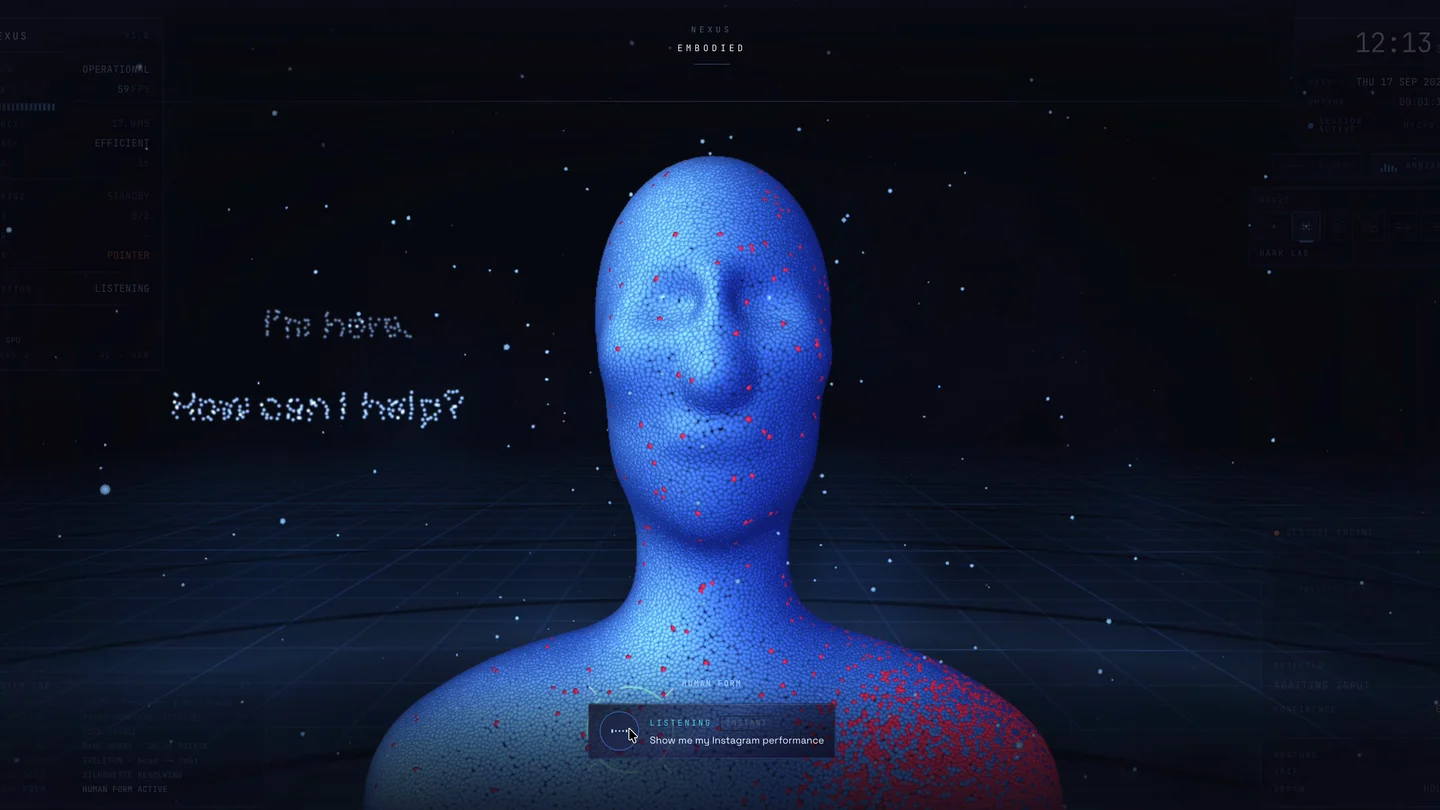
  • Watch it take a body — say "Nexus, transform into a human shape" and the interface dissolves into particles that reassemble as a digital human that talks and presents live panels with its hand; "return to spatial mode" brings the room back.
  • Let it control your Mac — launch apps, play and pause media, set the volume, take screenshots, write Notes and Reminders — by switching on the desktop bridge.
  • Make it yours — point the feeds at your own holdings, GitHub account, leagues and news in one config file, and change anything else in the source.

What it is not

  • Not a hosted or cloud service. It runs on your machine. Putting it on a public URL without adding your own login means anyone who finds it can spend your Gemini quota and see your connected feeds — and the desktop bridge only works on the machine serving it.
  • Not built for phones or every browser. It is designed for a desktop browser with WebGL2 and a webcam. Voice input uses the browser's own speech recognition, which works in Chrome and Edge but not Firefox — you can always type a command with /.
  • Not private by default for voice. In Chrome, speech recognition sends your audio to Google for transcription; that is the browser's behaviour, not something the app can switch off. What you ask the assistant is sent to Google's Gemini API.
  • Not cross-platform for desktop control. Launching apps, media, volume, screenshots, Notes and Reminders work only on macOS, only after you set NEXUS_DESKTOP_BRIDGE=1, and some need macOS permissions (Screen Recording, Automation, Accessibility). On Windows and Linux those commands are refused; the rest of NEXUS still works.
  • Not unlimited on the free tier. Gemini's free tier has daily limits, and answers grounded in live web search run out first. Heavier use needs a paid Gemini key, billed to you by Google.
  • Not keyless everywhere. Calendar needs a published calendar link, and Instagram needs a Business or Creator account linked to a Facebook Page, a Meta app and a token. Without them those two modules show SETUP REQUIRED — they never show made-up numbers.
  • Not exclusive code. The source is MIT licensed, so you — and anyone you share it with — may reuse and redistribute the code. The prompt pack is ours and can't be resold or redistributed.
  • Not a guarantee, and not a support contract. Live data comes from free public endpoints — Yahoo Finance, ESPN, Open-Meteo, Hacker News — that can change or rate-limit without notice. The pack is sold as it is: anything broken or missing we fix, but custom modules and setup help are separate studio work.

About the prompt on its own

The prompt pack is the seven briefs, in order, that took an empty folder to this build — foundation, AI brain, knowledge engine, environments, OS bridge, cinematic polish and the human form. It is not the code. A coding agent following them builds its own version, which won't match this one line for line. If you want NEXUS exactly as shown, that is the source, which comes with All-Access Yearly or Lifetime.

Setup guide

From zip to talking to it

Four parts, in order. Part 1 alone gives you the whole spatial environment, free — the assistant, your own data and control of your Mac are each one step further.

Part 1

Run it on your machine

About 10 minutes

The whole spatial environment — worlds, gestures and the live modules that need no keys. Nothing to sign up for.

  1. Install Node.js

    Download the LTS version from nodejs.org and run the installer. NEXUS needs Node.js 18 or newer.

    Check it worked — this should print a version number:

    node --version
  2. Unzip the pack and open a terminal in the folder

    On a Mac, right-click the folder in Finder and choose New Terminal at Folder. On Windows, open the folder, click the address bar, type cmd and press Enter.

  3. Install the dependencies

    One time only. It also copies the MediaPipe hand-tracking files into the project for you.

    npm install
  4. Create your settings file and start it

    .env.local is where your keys go. It is never committed and is read only on the server, so no key reaches the browser.

    cp .env.example .env.local
    npm run dev
  5. Open it in Chrome or Edge

    Go to http://localhost:3000. Allow the camera to use hand tracking, or choose to continue without a camera and use the mouse and keyboard. Leave the terminal open while you use it; Ctrl+C stops it.

  6. Find your way around

    Press 16 to switch worlds, A and D to rotate the ring, W to expand a module and S to collapse it, Space to freeze everything. With a camera: swipe to rotate, pinch to grab, pull your hand towards the screen to expand.

Part 2

Turn on the assistant

About 5 minutes

One key makes NEXUS listen, think and talk back.

  1. Get a Gemini key

    Create one at aistudio.google.com/apikey. The free tier is enough to start.

  2. Add it and restart

    Put it in .env.local, then stop the server and run npm run dev again — the file is only read at start-up.

    GEMINI_API_KEY=your-key-here
  3. Wake it and talk

    Say "Nexus", draw a circle in the air, press N or click the microphone, and allow microphone access. Try "Open Stocks", "How is Nvidia today?" or "Take me to the observatory". Talk over it to interrupt, or press / to type instead.

  4. Optional: pin a model

    By default NEXUS falls back across Gemini models so it keeps working through the free tier's per-model daily limit. Set GEMINI_MODEL in .env.local to use one model only.

Part 3

Connect your own data

About 15 minutes

Seven of the nine live modules already work. These steps make them yours and unlock the last two. Full detail is in docs/INTEGRATIONS.md.

  1. Point the feeds at your world

    Edit src/config/sources.ts — portfolio holdings, GitHub account, ESPN leagues, RSS feeds, default location and refresh intervals. No other file needs touching.

  2. Calendar

    In Google Calendar open Settings → your calendar → "Secret address in iCal format", copy it, and add it to .env.local:

    CALENDAR_ICS_URL=https://calendar.google.com/calendar/ical/…
  3. Instagram

    Switch the account to Business or Creator, link it to a Facebook Page, create a Meta developer app with the Instagram Graph API, and generate a long-lived token. Then set INSTAGRAM_ACCESS_TOKEN and INSTAGRAM_USER_ID. A personal account cannot work, whatever token you use.

  4. Optional: a GitHub token

    GITHUB_TOKEN raises the GitHub rate limit from 60 to 5,000 requests an hour. No private scopes are needed.

Part 4

Let it control your Mac

About 10 minutes

macOS only. Off by default, because a local API that launches apps deserves a deliberate yes. Full detail is in docs/DESKTOP.md.

  1. Switch the bridge on

    Add this to .env.local and restart. The system log shows BRIDGE ONLINE with the number of applications it found.

    NEXUS_DESKTOP_BRIDGE=1
  2. Grant the macOS permissions it asks for

    System Settings → Privacy & Security: Screen Recording for your terminal app (screenshots); Automation for your terminal and each target app (Notes, Reminders, media); Accessibility for your terminal (hiding windows, locking the screen). Restart the dev server after granting.

  3. Try it

    "Open Spotify", "Volume 40", "Take a screenshot", "Remind me to call the bank at 4".

  4. Keep it on your machine

    The bridge only answers requests from this computer and this site, and it has no shutdown, restart or delete commands. Don't expose the dev server to your network or the internet, and remove the flag whenever you don't need it.

Shortcut

Or let a coding agent do Part 1

Open the unzipped folder in Claude Code, Cursor, Antigravity or Windsurf and paste this. You still need Node.js installed, and the agent will not add keys or change code unless you ask.

Read README.md. Install the dependencies, create .env.local from .env.example, start NEXUS and give me the URL. Don't add API keys, turn on the desktop bridge or change any code unless I ask.

If something goes wrong

The camera doesn't start

Browsers only allow the camera on a secure address — http://localhost:3000 counts. Check the camera permission in the browser's site settings, or continue without a camera and use the mouse and keyboard.

It doesn't hear me

Use Chrome or Edge and allow the microphone; Firefox has no built-in speech recognition. You can always press / and type the same command.

The assistant stays offline

GEMINI_API_KEY is missing from .env.local, or the server hasn't been restarted since you added it. Stop it and run npm run dev again.

Answers stop partway through the day

That's the Gemini free tier's daily limit — web-grounded answers hit it first. Wait for the reset, or use a paid key.

A module says SETUP REQUIRED

It needs its own credential — Calendar and Instagram are the only two. Part 3 has the steps. This is deliberate: the module will not show made-up numbers.

"Open Spotify" does nothing

The bridge is off (set NEXUS_DESKTOP_BRIDGE=1 and restart), you are not on macOS, or your terminal needs Automation permission for that app.

Screenshots fail with "could not create image from display"

Grant Screen Recording to your terminal app in System Settings → Privacy & Security, then restart the dev server.

npm install fails with EACCES or a permissions error

Your npm cache has files owned by another user. On a Mac or Linux run sudo chown -R $(id -u):$(id -g) ~/.npm, then npm install again.

Still stuck, or something in the pack is broken? Email support@brandmotion.in with what you ran and what it printed. Want it set up or customised for you? Talk to the studio.